



Mode Overview & Status Bar
Penodoro supports six operation modes that you can access via the pop-up menu (double-click the knob). The available modes are:
- CLOCK – Digital clock
- FOCUS – Pomodoro productivity mode
- COUNT – Stopwatch
- TIMER – Countdown timer
- SETUP – System configuration
- MAGIC – Text reading mode (only shown when Magic is enabled)
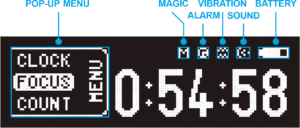
Status Bar Indicators:
- MAGIC — Indicates the Magic Enable function status.
- When enabled, the text reading function will automatically hide when the pen is not in hand.
- ALARM — Indicates the Alarm clock Enable function status.
- VIBRATION — Shows the vibration notification status.
- When active, the pen provides gentle vibration reminders.
- SOUND — Indicates the sound notification status.
- When disabled, the pen operates in silent mode.
- BATTERY — Shows the current battery level.
- Low battery will trigger a blinking indicator or auto power-off protection.
1. CLOCK Mode
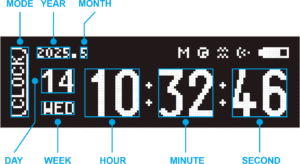
- Displays the current date and time. The screen shows:
- Year, Month, Day, Weekday, Hour, Minute, Second
2. FOCUS Mode
Used during Pomodoro cycles. Display includes:
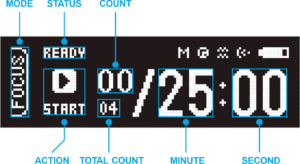
- MODE – Current work mode
- STATUS – Running, paused, or stop
- COUNT – Number of Pomodoro cycles completed
- ACTION – Next actionable command
- TOTAL COUNT – Total cycles planned
- MINUTE / SECOND – Time within the current cycle
3. COUNT Mode (Stopwatch)
A stopwatch functionality with:
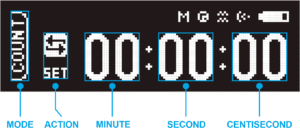
- MODE – Current mode
- ACTION – Running, paused, or reset
- MINUTE / SECOND – Elapsed minutes and seconds
- CENTISECOND – Fractional seconds display
4. TIMER Mode (Countdown)
For countdown tasks. Display shows:
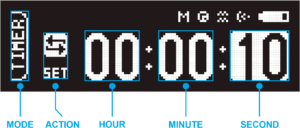
- MODE – Current mode
- ACTION – Running or paused
- HOUR / MINUTE / SECOND – Time remaining
To set the countdown, turn the knob to change each digit, then click to confirm. After seconds are set, click again to start the countdown immediately.
5. SETUP Mode
Used to configure system parameters. The screen shows two panels:
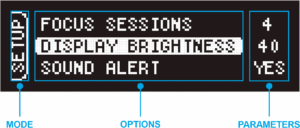
- Left: Options List (names of configurable items)
- Right: Current Parameters / Value Adjustment
Select an option on the left to edit its parameter on the right. After adjusting the value, click to return to the option list.
6. MAGIC Mode (Text Reading Mode)
- For more information about Magic Mode, see the dedicated chapter [Magic Mode].
- This guide is written for firmware version PENODORO_EAP_V2.1.
- Future updates may introduce additional features or interface changes.